Showing posts with label Google. Show all posts

2007-09-27

Happy 9th Birthday Google!

It's Google's 9th Birthday today. Happy Birthday Google!
I was very much moved by a comment left by a visitor to my blog post
Happy Birthday Google!, exactly one year ago..

prakashraju said...
YOU ARE MY GOD ALMIGHTY!!!!
EVERYTHING IS IN YOU!!!!

I LOVE YOU GOOGLE!!
WITHOUT YOU MY DAYS WON'T START!!
I WISH YOU MANY MANY HAPPY RETURNS OF THE DAY!!!

I PRAY FOR YOUR SUCCESS!!!!
WITH LOVE & AFFECTION!

yours forever!!!!

I couldn't agree more.

Well this time I thought of bringing some facts about the Web search, the thing that Google does best...
  • Choose your search term wisely. Multiple terms will narrow down your search.
  • The order in which search terms are entered will effect the results.
  • All letters are treated as lowercase even if you type in uppercase letters.
  • and >> No need to have 'and' between words. By default all search terms entered are searched for.
  • + >> common words & single digits & characters are ignored in Google searches. To include them, you need to have + sign in front it.
  • " " >> having quotes around search terms will search for exact phrase.
  • - >> to exclude a term from the search, add a - sign in front of the term
  • ~ >> to include synonyms in a search
    • Eg: ~food research includes results with Food, Nutrition, Restaurant , etc.. as synonyms of food
  • OR >> to include either of the terms, put uppercase 'OR' between two search terms.
  • .. >> to include a number range, which can be years, $, v, kg etc.. as you specify.
  • * >> to include one or more keywords in it's place. Google will fill in the blanks.
  • site: >> to restrict a search to a particular web site.
  • allintitle: >> to restrict for search terms appearing only in the title of web pages.
  • intitle: >> to find web pages with the search term appearing immediately after 'intitle:' in the title of a web page. Note: No space between 'intitle:' & search term.
  • allinurl: >> to find web pages with all of the search terms occurring in their URL.
  • inurl: >> to find web pages with the term immediately after 'inurl:' occurring in the url. Note: No space between 'inurl:' & search term.
  • link: >> to find web pages that link to a particular site.
  • related: >> to find similar web pages to a specified web page.
  • cache: >> to get last snapshot Google bot created
  • info: >> to get information Google has collected about a web page.
  • definition: >> to get a definition of a word, as given in various web sites
  • filetype: or ext: >> to retrict search to a file type other than html. Supported types are,
    • Adobe Portable Document Format (pdf)
    • Adobe PostScript (ps)
    • Lotus 1-2-3 (wk1, wk2, wk3, wk4, wk5, wki, wks, wku)
    • Lotus WordPro (lwp)
    • MacWrite (mw)
    • Microsoft Excel (xls)
    • Microsoft PowerPoint (ppt)
    • Microsoft Word (doc)
    • Microsoft Works (wks, wps, wdb)
    • Microsoft Write (wri)
    • Rich Text Format (rtf)
    • Shockwave Flash (swf)
    • Text (ans, txt)
Further readings at Google: Web Search Help Center :

2007-09-16

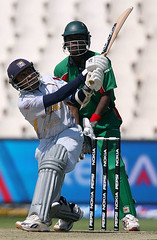
Cricket Scores @ Google


Originally uploaded by zahidul islam
I was amazed to find that Google search box can be used to see the latest Cricket Scores in Twenty20 world championship matches being played.
You can just type Cricket for results of the latest match or Cricket Sri Lanka for your favorite team or Cricket Sri Lanka New Zealand for a specific match. A summery of the score card is shown with a link to the complete score card.
After all Google seems to have noticed the enthusiasm among Cricketing fans...

2007-04-20

Let down by a friend...

The first two things I do after returning form a busy days work are, check my email, then check site statistics of visitors to this blog. After doing these two today, I loaded up my blog in another tab just to check whether all is well after the changes I've made to layout during past few weeks.
Nothing was special, or is it? There is a message at the end of the web page from Firefox's NoScript Add-on. That was odd. I have enabled all the scripts from my blog. Still there is another new java script that has not been enabled, originating from my own blog!! See the screen capture below.
As it was not there yesterday when I loaded the blog, I just thought of doing a Google search to get to know more about it.
I was shocked to read the search results. I was shocked more than on that day that I had my blogger account switched (see Blogger busted... & Blogger busted - part II).
My trusted site statistics tracking service, sitemeter had deceived me. Please read this article SiteMeter Installing SpyWare In Your Website?. It seems they have sold the trust we kept on them to a third party. I am ashamed to be associated with them.
As bloggers, most of us rely on site statistics tracking services to keep track of the visitors to our blogs (and of course to other web pages). We check on statistics regularly to see just how many read our sites, what search quarries bring traffic to our sites etc..
But it seems sitemeter had been tracking all our blog readers' web browsing habits with the help from specificclick.net. Thats a bit unethical to say the least.
So please read Things you should know before using Sitemeter. At the end of it you can see how you can remove tracking cookies that have been installed from Sitemeter's partner specificclick.net. If you have visited this blog earlier or have visited another site that used their service, please try block their cookies, as they may have already placed their cookies in your browser.
Dear friends of the blogsphere, if you are using sitemeter, then you are exposing your site visitors to being spied upon. Take care of your valued site visitors!!! I have already...

2007-04-15

Migration complete!

Well it was sometime back that I upgraded to new blogger. But I was stuck with my classic 3-column-template (provide free by Thur's tempates), because I thought it's a waste of browser space to have only one sidebar rather than having two of them.
After migrating to new blogger, I started working on the new template. A List Apart & TJKDesign were of great help. But I couldn't do it alone.
So I started looking for a new 3 column blog template, which supported the new blogger. Well it was too early & all blog hackers were busy creating hacks. I couldn't find a template that suited my needs (like fluid middle column, first loading the main section rather than sidebars, etc.).
Finally I found the template I was looking for, at Dummies Guide to Google Blogger Beta. I did the necessary changes so it looked the way I want.
Please use comments below if you find any bugs when loading in your browser෴

2007-01-12

Blogger busted - part II

The things are getting out of control.

If you haven't seen the earlier post Blogger busted, please read it first.
Today I got an email from the owner of the blog that I talked about in the previous post. It seems he had got stuck in my blogger dashboard. Please see the comments in that post or click here.
Today I could login to my blogger dashboard with out any problem. Well thats a relief...
But not for long... I clicked on my profile to edit some details. Alas, my profile name was different.
It is happeing again. It's somebody else's profile. See first image below. To see the blogs he had published, I just clicked on 'select blogs to display' link. Well the next screen was even worse (second image). It belonged to another person. So now I have access to parts of three other blogger accounts. All this seems to be from Sri Lanka or at least Sri Lanka & India.
Still by clicking link to dashboard from that profile, i could access my profile.
Why is this happening to me? Hope others will not change any settings , if they have access to my blogger dashboard.
Is any of you blogger users out there having the same problem?
I had no problem with this blogger account for years & it seems all these blogger accounts that I have access to are newer ones.
I don't know to whom I should report this to. We have already reported this to blogger support.

Why me? Why is this thing happening to me?
I am posting this in a hurry, because I may not be able to log into Blogger next time.
Hope this will be resolved soon by Google engineers!

Blogger busted...

Today I had the shock of my life when I tried to log into Blogger to put up a new post. When I typed in my user name & password to blogger login page, the blogger dashboard looked bit weird. To my shock there was only one blog (rather than the 3, of which 2 are for testing purposes), & it's name also appeared to be so long Adventures of Scotty White. Then only I saw that the user's email address is different from my one. It was some c*****.s**********@gmail.com (see images below). In this account, I could do some things like put up a new post, change blogger layout, etc, etc. But it asked for user name & password again, when I tried to change important settings like changeling profile info, etc.
Well first I was bit excited to get to somebody else's account by chance, but when I got to know that repeated attempts at logging in to my account took me to this same account, which belonged to somebody else, I was bit shocked.
Well may be it's my destiny to start writing this Scotty's adventure...
Finally I managed to log into my blogger account, but when I typed in the URL to see the Scotty's blog (the other blog I was logged into by mistake), it still appeared as if the author of that other blog has logged in (see 3rd image below), rather than showing my email address.
I wonder how much our accounts at Google are secure. For it being a free service we can not expect more. And also I wonder whether any body else went through this same experience.

2006-09-27

Happy Birthday Google!

Google 8th Birthday Logo

When I went to Google home page to do some searching to find some facts for my next blog post, I was surprised to see the Google logo. It's Google's Birthday!!! Then I did some searches & got these old Google Birthday logos.

Google 7th BirthdayGoogle 6th BirthdayGoogle 5th BirthdayGoogle 4th Birthday.gif

Google derives from Googol which means 1.0 × 10100. It's founders are Larry Page and Sergey Brin. You can read about all the Google milestones here.

I wonder how much we use Google services daily. If Google weren't here, I wonder how different a world we would be in. My list of Favorite Google services are as follows:

Gmail logo

Gmail

Read more about it here

Google logo

Google Search

Blogger Logo

Blogger

GoogleToolbar logo

Google Toolbar

Google News logo

Google News

Picasa logo

Picasa

Google Book Search logo

Book Search
Read more about it here

Google Image Search logo

Google Image search

Orkut logo

Orkut

GooglePages logo

Google Page Creator

Google Groups logo

Google Groups

Google Spreadsheets Logo

Google Spreadsheets

Google Calendar Logo

Google Calendar

Google Desktop Logo

Google Desktop

Geogle Analytics Logo

Google Analytics


Google Maps Logo

Google Maps


Google Language Tools

Google Labs

Google Labs

Google Earth Logo

Google Earth

Google Notebook Logo

Google Notebook

Google news Logo

Google News Archive Search


For a more complete list of Google Services please visit Wikipedia

Happy 8th Birthday, Google!

2006-09-14

Freedom to Read...

I was searching for Robert Knox's 'An Historical Relation of the Island Ceylon' when I stumbled upon this two great free resources. I was amazed to see how much free content they had & we are so ignorant as not to use them.

Project Gutenberg

This was started by Michael Hart in 1971 & named the project after Joannes Gutenberg who innovated the printing press.
By August 2006 there are 19000 free ebooks in Project Gutenberg.
Material is added only after it has received a copyright clearance according to US copyright law.


Google Book Search
Google offers full view of books that are out of copyright. (Also google continues to offer those books that are still in copyright, which can be searched for keywords & will be presented with a small snippet of the surrounding text to the relevant keyword & there will be links to stores where you can buy the book)
They simply provide full text view of books according to the copyright law of the viewers country. There is a link where PDF formats of the relevant ebook can be downloaded if they are out of copyright.
Also from yesterday (August 12) they are offering 42 Banned Books


Google Book Search


Also see a List of digital library projects

2006-06-29

Gmail

arGmail by Google

What is Gmail?
ItÂ’s GoogleÂ’s free webmail service, also known as Googlemail in UK & Germany due to copyright issues. Initially launched in April 1st, 2004.

Storage:
Initially launched with 1GB of free space & was increased to 2GB at its first anniversary. Now it provides over 2.7GB & counting at a rate of 0.000032470826991374936580416032470827 megabytes per second which is 1GB per year

Features:
Conversation View:
GoogleÂ’s innovative method of categorizing emails, where Gmail keeps related emails together, so all emails related to a single email are kept in a single stack. Gmail users can delete a whole conversation or individual emails from a collection of emails from a conversation.

Labels:
Gmail has labels rather than folders, where one email could have more than one label.

Integrated Search:
Gmail incorporates GoogleÂ’s powerful search capability, making finding an email sent or received very easy

Access:
Gmail allows web interface in addition to free automatic forwarding & POP3 access. For mobile access, point mobile phoneÂ’s web browser to http://m.gmail.com.

Spam Filtering:
Innovative Google Technology filters spam using sophisticated filters.

Virus Protection:
Gmail scans all attachments for viruses & tries to remove if found. Gmail does not allow attaching executable files, as they are the major source for distribution of viruses.

Relevant Text Ads:
Gmail displays only relevant text ads. No Pop-ups or Banner ads.

Auto-save:
Saves a draft copy of current message & saves any attachments, once per minute, to prevent loss of data.

Optional Dots:
The Gmail usernames must be of 6 to 30 characters comprising of letters, numbers or dots & cannot include hyphens(-) & underscores(_). But Gmail ignores dots when resolving addresses. So my.name@gmail.com is as same as myname@gmail.com & m.y.n.a.m.e@gmail.com. Also Gmail is case Insensitive.

Plus-addressing:
Gmail supports a tag to be added to your email address where it can be written as my.name+tag@gmail.com. This can be used to track email address provided to different services & people.

Customized ‘From’ Address:
Gmail can be customized to display as been sent from another of your addresses Eg: my.name@yahoo.com

Google Talk:
Gmail allows users to chat with Google Talk Network users with in Gmail window. So users can chat with their contacts if they are online.
Also it includes Contact pictures & auditory notification when new messages arrive. But voice calling is not supported by Gmail.

Google Calendar:
Gmail incorporates powerful Google Calendar where events can be added using natural language phrases & numerous more powerful features.

View as HTML:
Gmail allows attachments of Microsoft Office, OpenOffice & .pdf type files to be viewed as HTML pages rather than downloading the attachments or when in a hurry, using a mobile device or when the software needed to view the file is not installed.

and,
Vacation Auto Responder,
Contact Groups,
Filters,
Many Languages (even some left-to-right languages),
RSS Feeds,
Address & Package Tracking as Shortcuts,
Offline Access with Google Desktop,
Photo Upload to Gmail with Picasa,
Archiving Emails,
Spellchecker,
Gmail for Your Domain


Privacy Issue:
Some amount of Privacy concern is there regarding Gmail, mainly because all emails are automatically under go software-based scanning to determine relevant text advertisements.

Supported Browsers:


Standard:
Microsoft IE 5.5+
Netscape 7.1+
Mozilla 1.4+
Mozilla Firefox 0.8+
Safari 1.2.1+
Opera 6.03+

Standard with chat:
Microsoft IE 6.0+
Mozilla Firefox 1.0+

HTML view only:
Microsoft IE 4.0+
Netscape 4.07+
Lynx


Deactivation of Account:
Gmail account is deactivated if not used for 9 months, which is far more than most of the other free webmail providers.

How to get a Gmail Account:
Gmail is still in Beta testing stage & opening a Gmail account is still by using an invitation

By Mobile Phone:
Mobile phone users from US, Australia, Malaysia, Indonesia, Thailand, New Zealand, the Philippines, Singapore and Turkey can receive invitation code by filling form in Gmail website.

By Google Invitation:
If you own a .edu email address or Blogspot blogger, you may receive an invitation from Google. Occasionally in search page an invitation is provided on the top bar.

By a Friend:
Gmail users can send Invitations to their friends.

If you cannot get a Gmail Invitation, please feel free to ask for an invitation from me. Use the provided email form in the left Sidebar of this blog to send the request to me. Please remember to include your email address as well .

P.S.: I get so many requests, but few of the invitees do not seem to open the Gmail accounts. Please if you wish not to open a Gmail account, forward the invitation to one of your needy friends or back to me.
Also note that the Gmail invitations sent to other webmail services sometimes get categorized as Spam or Bulkmail. So please check those folders as well, if you requested for an invitation. Please be patient, If you requested for an invitation, I will definitely send you one.